Prefer --nr, --sf; use --pr with caution; avoid --lf if Dec is not low.
Common parameters:
--replace_rfi: Set detected RFI as nan in spetra data (T or flux), instead of storing their flags in is_rfi.
--rms_frange:
The frequency range for calculating rms, choose a range free of signals and interference.
For example, --rms_frange14001410. If not specified, it will try to determine automatically.
This parameter is needed when --nr, --sf are True.
--mw_frange:
A rough range for the Milky Way, to prevent mistaking it for RFI.
--all_beams:
Average the 19 beams, making it easier to identify RFI present in all beams. Currently used for --sf and manual marking stages.
Please note, when --all_beamsTrue, do not use beam parallel processing. It’s recommended to first process M01 separately, generating files with suffix ‘xxx-M01-xxx-19rfi.hdf5’ (this may be slow). Subsequent processing will directly apply the 19rfi file.
If parallel processing is used, it will generate a large number of 19rfi files, and subsequent processing will fail (because there should only be one 19rfi file in the current output path). Therefore, if you are not familiar with this function, please use it with caution.
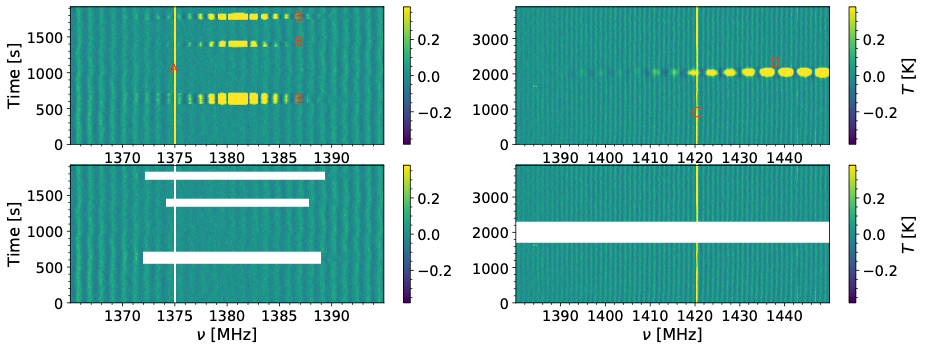
lf: Long-freq time RFI. Similar to the wide-frequency domain RFI in the figure (D), possibly satellites.
sf: Short-freq time RFI. Similar to the narrow-frequency domain RFI around 1380MHz in the figure (B), mainly GPS.
tr: Time domain continuous RFI. RFI continuously present in the time domain. Initially designed for 8MHz RFI, may not be fully marked, now not recommended for use.
nr: Narrowband single channel RFI. Single channel frequency domain RFI, like the vertical lines in the figure (A,C).
pdr: Periodic 8 MHZ RFI. Gaussian-shaped RFI at 8MHz intervals, from compressors, eliminated as of July 2021.
pr: Polarized RFI. RFI with significant polarization differences.
Input files generated from manually marking RFI using .reg. For marking methods, see Manually masking RFI.
--reg_from parameter:
--reg_fromnone: No processing.
--reg_fromdefault: looking for a DS9 format region file named as the input file path + ‘.reg’. If not found, it will skip.
--reg_fromshared: Some beams will share the same region file, suitable for RFI appearing in multiple beams.
Combined with --reg_shared_beams to specify which beams will share the same *-19rfi.hdf5.reg file in the output path, by default all,
meaning all 19 beams are needed. This requires manual masking on xxx-M01-xxx-19rfi.hdf5. For example, with --reg_shared_beams4,9,14,
only beams 4, 9, and 14 will apply the region file with the same suffix as the input file and unique in the output path.
This requires manual marking on -bld.hdf5 (or similar).
This process is complex and time-consuming.
These three parameters may seem complex, but they share the same function/principle. Their common parameters are:
lf_frange, sf_frange: Search for RFI within this frequency range, i.e., only average within this frequency range for detection. For nr, it averages over all time.
--lsn_thr_type: Method for selecting threshold value, default is input_absmed_times, using the absolute value of the median as the threshold.
--lf_mean_times, --sf_mean_times, --nr_mean_times: Threshold values needed to identify abnormal spectral lines/channels after averaging
--lf_diff_times, --sf_diff_times, --nr_diff_times: For lf, RFI boundaries are gradual (thus set to 0). For sf and nr, edges are typically steep, so use the absolute value of the difference in averaged spectral lines to define steep edges for sf/nr, preventing the marking of potential signals.
--lf_rfi_last, --sf_rfi_last, --nr_rfi_width_lim: Duration (number of lines)/width (number of channels) of the RFI, lf is usually wide, nr is very narrow
--lf_ext_add, --sf_ext_add: Extend the marking range of RFI on both sides, unit in channel numbers.
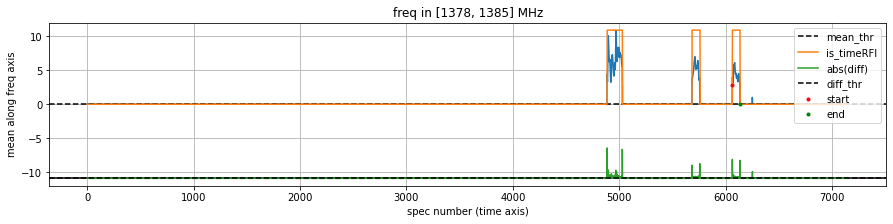
The blue line in the image is the average of all spectral lines along the frequency direction within the frange, with the average threshold (black dashed line) set to --xx_mean_times times the median;
The green line is the absolute value of the difference between subsequent channels, necessary for sf as the difference threshold (black dashed line), set to --xx_diff_times times the median.
The green line is shifted downward by the maximum value of the blue line for display purposes, to fit them in one graph.
rfis start at … end in … indicates which spectral lines meet the rfi_width_lim and threshold times condition, with only 3 mask franges output, indicating three that meet the steep edge criteria.
The orange line marks the range.
You can understand specific parameters through the example Notebook. It’s recommended to adjust parameters via Jupyter if unfamiliar.
Wide frequency range time-domain RFI, possibly caused by low declination geostationary satellites. Generally not visible at high declinations, so set to False.
Specific parameters can be found in the example notebook:
--lf: Set to True to mark long RFI.
--lf_mask_rms_times: If -1, will mark the entire spectral line; if 0, only mark the frange area where RFI spectral lines are present (but be aware if the frange area is too large, the remaining part’s FFT ripple removal effect may worsen); if greater than 0, only mark parts of the RFI spectral lines exceeding a multiple of the RMS threshold, extending edges in the frequency direction using ext_add.
Short horizontal time-domain RFI, caused by GPS L3, often appearing around 1380~1382MHz, affecting nearby 3~10MHz.
Specific parameters can be found in the example
notebook:
--sf: Set to True to mark short RFI.
--sf_mask_rms_times: This is a positive number, masking a small frange area, extending from the RFI peak along the half-width at half maximum. To prevent excessive masking, it usually stops extending at 2~2.5 times the RMS.
Specific parameters can be found in the example notebook:
--nr: Set to True to mark narrow RFI. For W-band observations, narrow RFI usually occupies one or two channels.
--nr_mask_rms_times: If 0, will mark the entire channel; if greater than 0, only mark parts of the RFI channel exceeding a multiple of the RMS threshold, extending edges in the time direction using ext_add.
Periodic 8.1 MHz RFI, which ceased after July 2021.
Omitting excessive parameters, the notebook provides a detailed introduction. The principle is as follows:
Select the largest peak among all peaks exceeding a certain noise level, then search for similarly exceeding peaks at approximately 8.1MHz intervals in front and behind, grouping them. Repeat the process to identify the second, third groups.
Use least squares fitting to precisely determine the frequency of each group of RFI, then mark the RFI range based on the estimated frequency.
Identifies RFI by significant differences between two polarizations, XX and YY. Be cautious as the Milky Way may sometimes be marked; however, pr is useful for highly polarized RFI, though the edges may not be fully marked.
--pr: Set to True to compare two polarizations, marking the corresponding channel as RFI if the deviation is significant.
--pr_s_sigma: Gaussian smoothing along the time dimension of spectral lines with pr_s_sigma as sigma to improve the signal-to-noise ratio
It’s advised to first test with M01. If you want to ensure all sf is marked without missing, you can try using --all_beams, then --sf_use_time_only can directly use the counts marked in xxx-M01-xxx-19rfi but determine the mask range for each beam separately. If unfamiliar, avoid using --all_beams and determine the mask range for each beam separately.
If there is RFI with a very long frequency (possibly narrow, just a few hundred lines, likely satellite-induced, similar to a continuous spectrum), it may lead to excessive sf marking. In this case, it’s recommended to first manually mark with CARTA, then run sf. If only individual beams have issues, also avoid using --all_beams, as it may affect other beams.
It’s recommended to use hifast.waterfall to check the mask effect (excessive or insufficient masking). If necessary, generate a cube and manually inspect it, iterating the above process.